In Part 1 of this series, I got Calendar Copilot's background tasks running fairly reliably, but there was still a problem: if I stopped opening my app for long enough, background execution would eventually peter off. The calendar sync could be working perfectly, with nothing for me to check or change, and I still had to open it every week or two to keep it running.
That was a frustrating requirement for an app whose main job is to do things for you in the background. I'd already spent a lot of time on task scheduling, re-arming requests, and making execution runs finish quickly. So I started looking for another way to get background execution time when someone hadn't opened CalCopilot recently.
The cheat code? An hourly silent push notification that I'll refer to as a wake ping. Apple calls these background notifications. A whipped up a Cloudflare Worker that creates a public database record in CloudKit every hour, which triggers a notification to CalCopilot that wakes it. Cloudflare was an easy choice because that hourly cron trigger fits within their free plan.
How the wake ping works

records/modify request and sends it to CloudKit. Apple manages notification delivery to the subscribed devices. When iOS delivers the notification, your app wakes and gets 30 seconds of execution time.This useful detail was in Apple's WWDC 2020 session, Background execution demystified. When discussing silent pushes, Apple makes this distinction:
The system does not gate background pushes based on app usage.
That gave me the clue on how to address the problem of consistently getting execution time, going beyond the capabilities of BGProcessingTask and BGAppRefreshTask scheduling.
There are still limits. Apple's background notification documentation states that “the system doesn’t guarantee their delivery” and says, “don’t try to send more than two or three per hour.” I chose one silent push per hour and kept the existing background tasks enabled, so CalCopilot could process actions through any and all mechanisms for maximum reliability.
Letting CloudKit do the not-so-heavy lifting
I didn't want to run a push server that collected or stored any information about my users, both out of respect for privacy and also I don't want the headache of maintaining anything I don't absolutely have to. CloudKit came to the rescue with this neat trick called query subscriptions, which Apple describes as:
A subscription that generates push notifications when CloudKit modifies records that match a predicate.
This only helps devices with iCloud enabled where the user chose CalCopilot's iCloud storage option. Otherwise, CalCopilot continues using the background processing methods from Part 1.
For these wake pings, the only custom data my Worker sends to CloudKit is an integer timestamp. Apple manages the subscriptions and notification delivery, so I don't have to track devices or maintain a device-token database. The Worker receives no list of recipients and no calendar data, so I can't identify users through these requests.
This also added nothing to my monthly bill. CloudKit is included in my Apple Developer Program membership, and the Worker stayed within the free plan at CalCopilot's current usage, with one record created per hour and older records cleaned up.
I set this up in three steps: first the database schema, then the subscription in CalCopilot, and finally the Worker that creates the records.
The shape of the public database
So I created a record type called WakePing in CalCopilot's public CloudKit database.
I used the production environment, with just one custom field: ts, an INT64 timestamp in Unix epoch seconds.
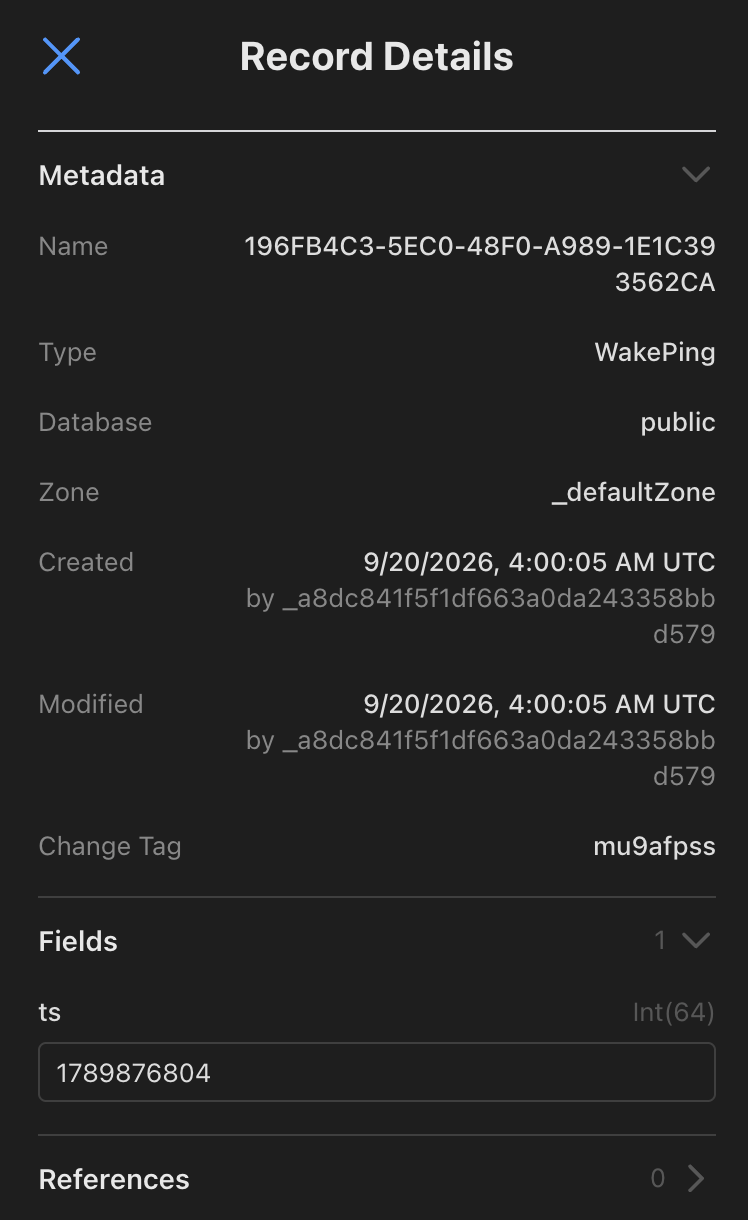
WakePing record in the CloudKit console. The console shows the creation and modification metadata separately from the custom ts field.Back to the app side of things
The next bit is registering a subscription to the database via a CKQuerySubscription in CalCopilot for the WakePing record type. Creating a record triggers a silent push that can wake CalCopilot in the background, without a notification popping up on the phone. CloudKit sends it through Apple Push Notification service (APNs).
let subscription = CKQuerySubscription(
    recordType: "WakePing",
    predicate: NSPredicate(value: true),  // match every record
    subscriptionID: "wake-ping-v1",
    options: [.firesOnRecordCreation]
)
let info = CKSubscription.NotificationInfo()
info.shouldSendContentAvailable = true
subscription.notificationInfo = info
_ = try await database.save(subscription)   // public database
Important: you want to set shouldSendContentAvailable to true to request background execution, with no alert, sound, or badge. CalCopilot only needs the notification to start processing actions, so there's no need to include the timestamp in its payload.
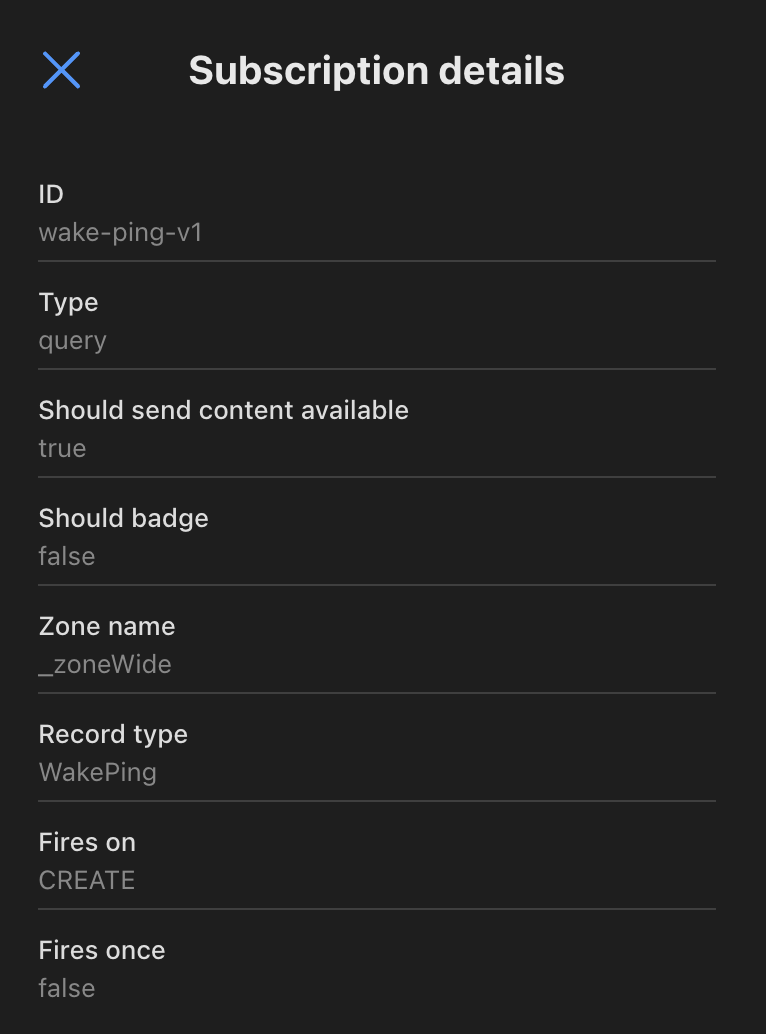
wake-ping-v1 subscription in the CloudKit console. Fires on: CREATE selects record creation, and Fires once: false keeps the subscription active for later records.Enabling silent pushes
To receive these notifications, I enabled Background fetch and Remote notifications under Background Modes and called UIApplication.shared.registerForRemoteNotifications(). Apple's subscription setup documentation and troubleshooting guide cover those requirements.
The Wake Worker
With the subscription in place, I needed something to create the records. This is the relevant part of the Worker, a very simple bit of TypeScript code that runs in the aforementioned Cloudflare cron trigger:
export async function buildModifyRequest(
  env: Env,
  ts: number,
  now: Date = new Date()
): Promise<SignedRequest> {
  const body = JSON.stringify({
    operations: [
      {
        operationType: "create",
        record: {
          recordType: "WakePing",
          fields: { ts: { value: ts } },
        },
      },
    ],
  });

  return buildSignedRequest(env, "records/modify", body, now);
}

// ....

export async function runWakePing(env: Env, deps: RunDeps = {}): Promise<RunResult> {
  const fetchImpl = deps.fetchImpl ?? fetch;
  const now = deps.now ?? new Date();
  const ts = Math.floor(now.getTime() / 1000);

  // ...
  const req = await buildModifyRequest(env, ts, now);
  const res = await fetchImpl(req.url, {
    method: "POST",
    headers: req.headers,
    body: req.body,
  });
  // ... handle the response and delete older WakePing records ...
}
buildModifyRequest prepares a signed request to CloudKit Web Services. I used a server-to-server key, following Apple's key setup and authentication instructions. After a successful write, the Worker attempts to delete older WakePing records so they don't accumulate indefinitely.
But I did hit a signing gotcha: Web Crypto's crypto.subtle.sign produced a raw P1363 signature that CloudKit rejected with a 401 response. I had to convert it to ASN.1 DER before base64-encoding it for the signature header. This JavaScript and TypeScript example covers the same failure and includes the conversion code.
Suddenly it's raining background triggers!
So now I have another reliable trigger alongside the existing background tasks, and it's nearly as good as BGProcessingTask with an allotted 30 seconds to do its work - practically a luxurious amount of time to run our actions. Now my problem was that syncs were running too frequently, hah!
So I added a Desired Sync Frequency picker in Settings, so that I could control a minimum sync frequency and ignore any triggers that arrived too soon (with a 10% grace period, I'm not a monster):

A few months in production
I've now had this running in production for a few months, still sending one wake ping per hour, and it's been fantastic. On my device, execution has been nearly perfect for weeks at a time, with no decay and no need to open my app. I've gone over 3 weeks and it still performs syncs on a rock-solid hourly schedule without me ever needing to worry about it anymore.
Calendar Copilot is on the App Store. Part 1 covers the background task scheduling and execution handling that I kept alongside these silent pushes.